Club messages getting lost: one thread per group
 Co-founder of Hudlo6 ottobre 202610 min di letturaVita del clubArticolo in inglese
Monday evening, the club president posts in the club's WhatsApp group: "Important: the AGM has been brought forward to the 28th, please confirm you're coming." Within the hour, the message is buried under a photo from Sunday's ride, three replies about a puncture and a debate about Saturday's route. On the 28th, half the club has no idea. Members do read. But you're asking them to read everything, in a single thread, to find the two messages that concern them.
In brief
- A single thread mixes announcements, chat and organisation. Members mute it, then stop reading altogether.
- The rule that works: one thread per real group (section, ability level, discipline) and an announcements channel nobody replies in. Plus one thread per event that needs organising.
- In Hudlo, every group has its own conversation. It fills and empties itself as you add members to the group or remove them.
- Targeted messages go to a group, a role or a single person, and each member sets their own notifications for the club, category by category.
One thread for everything, and nobody reads it
At first, one group is enough. The club has twenty members, everyone rides together, everyone knows each other. Then the club grows. There are juniors and adults, a road group and an MTB group, racers and leisure riders. The same thread keeps carrying everything.
From then on, each message only concerns a minority of readers. The group 2 ride means nothing to the juniors; the race trip means nothing to the leisure riders. So members mute the group. And the one real announcement from the committee lands in a thread nobody opens any more.
Why it's hard today
Three problems come up in almost every club.
- Everyone can post everywhere. An announcement draws replies ("ok", thumbs-ups, off-topic questions) that push it out of sight as fast as it arrived.
- The lists don't keep up with the club. A newcomer joins: someone has to remember to add them to the right group. A member changes level or leaves: they stay in the old threads for months.
- The groups live on one person's phone. WhatsApp group admins are often whoever created the group. When they leave the committee, they take the list management with them.
So before picking a tool, sort the messages. They don't all need the same channel.
| Type of message | Example | Who should get it | Where it goes |
|---|---|---|---|
| Official announcement | AGM date, membership renewal | The whole club | A channel nobody replies in |
| Group organisation | Ride meeting point, change of time | Members of the group | The group's conversation |
| One-off organisation | Car-sharing to a race, kit for a training camp | Those signed up | A thread created for the event, deleted afterwards |
| Question for one person | Missing document, jersey size | One person | A direct message |
| Open chat | Photos, results, kit advice | Whoever's interested | A discussion space, not the announcements thread |
Split by group: section, level, discipline
The right unit is the real group: the people you ride, run or swim with every week. For example "Road group 1", "Road group 2", "MTB", "Youth cycling", "Trail". A member of several groups gets the messages from each of them, and only those.
Two rules stop you sliding back into a single thread:
- One group, one purpose. The group is for organising that group's activity. Club announcements go elsewhere, and so does open chat.
- The member list follows the assignments. When someone moves up a level, they change group the same day. Otherwise messages reach the wrong people.
If you don't use a tool
The method that works with a consumer messaging app:
- An announcements channel where only the committee posts. WhatsApp offers communities, which include an announcements group where only admins can post (WhatsApp help on communities).
- One chat group per training group, named as it is in the club, with the usual meeting place and time in its description.
- A temporary group per trip or training camp, closed the following week.
- One announcement, one message. No three-part follow-ups. The date, the place, what you need from members, and the reply deadline.
- At least two admins per group, including one committee member, so list management doesn't leave with a single person.
- Someone in charge of the lists, who adds newcomers and removes leavers, with a reminder after each wave of new members.
- A short charter, pinned: what goes in each thread, and what doesn't.
The weak point of this method is discipline. Everything depends on one person keeping the lists up to date by hand, season after season.
With Hudlo: every group has its own conversation
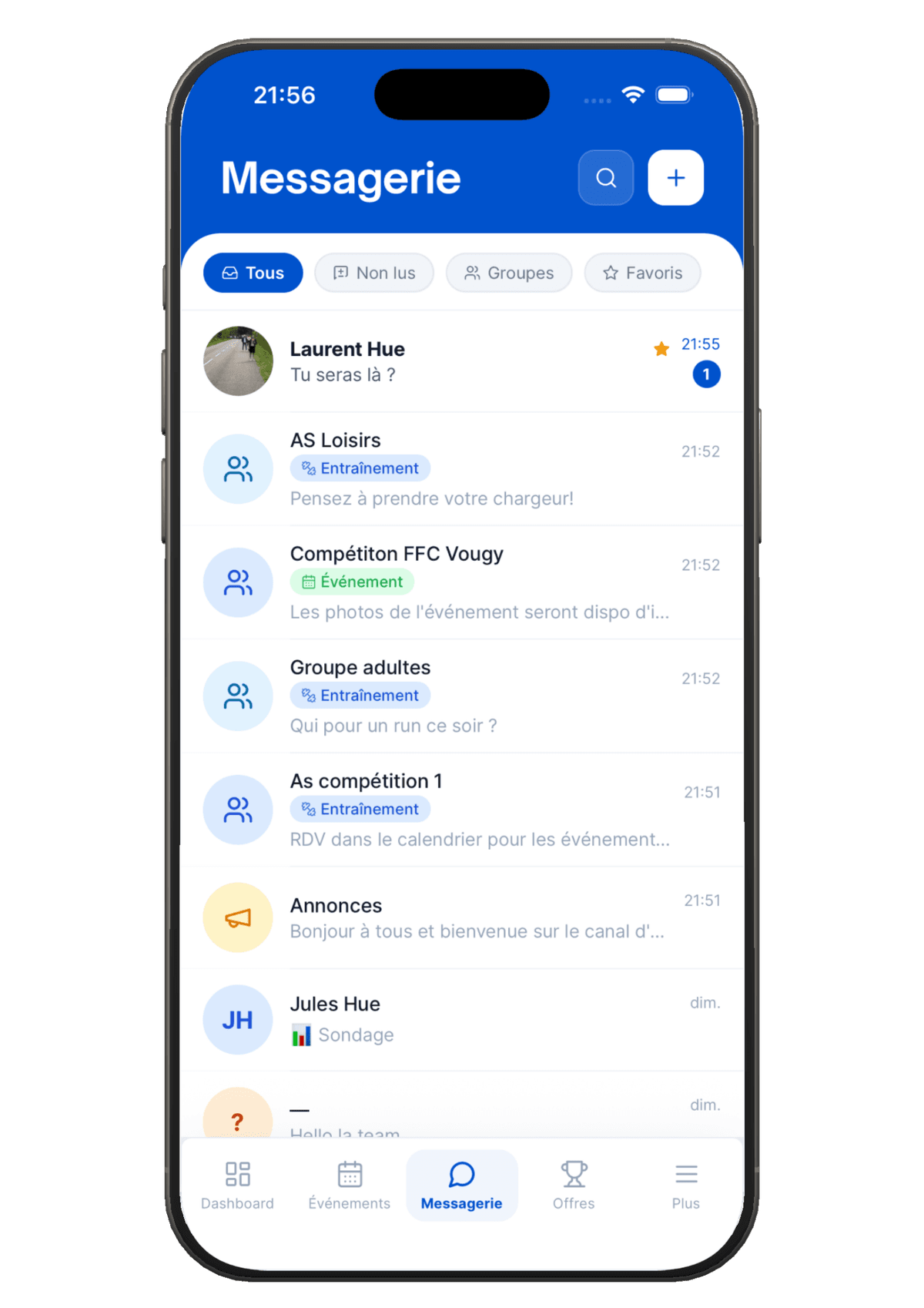
In Hudlo, messaging follows from how the club is organised. What the committee sets up in the management space, members see in Messages, on the web and in the iOS and Android app.
Create the groups, and the conversation follows
In the management space, the Groups page is where you build the club's structure: sections, ability levels, disciplines. Each group automatically creates its own messaging conversation. There's nothing else to open.
Do this before opening membership applications. Applicants see the list of groups when they apply and tick the ones they're interested in. Their choice is only a hint: you can change the groups before accepting. The full newcomer journey is covered in our article on welcoming new members, from application to first ride.
Assignments keep the messaging up to date
When accepted, the member joins the club, their groups and those groups' conversations. After that, they're added to a conversation as soon as they're assigned to a group, and removed as soon as they leave it. There's no messaging to manage by hand.
A member moves from group 2 to group 1 mid-season? You change their group once. They leave the group 2 conversation and join the group 1 one.
The same groups also control who can see each event. For the Saturday ride, see how to set up a ride per group and share the route.
The Announcements channel: read, don't reply
The club's messaging includes an Announcements channel. Every member is added when they join and removed when they leave. Members read it but can't reply, so the announcement stays at the top, with no "ok" or thumbs-up underneath.
In conversations, an important message can also be pinned. It stays visible at the top of the thread while the chat carries on.
Reach a group, a role or one person
The Announcements & Notifications page in the management space lets you write to part of the club. You pick the recipients: Whole club, By group, By role or Individual. Then the channel:
- a private Message, sent to each recipient in their own inbox. They can reply to it;
- a Notification, a short alert in the bell, with an optional link to the relevant page.
You write it, check the preview, then confirm. The number of recipients is shown before anything goes out. Example: reminding only the coaches about the technical meeting, without telling the whole club.
Polls, inside the conversation
Rather than counting free-text replies, post a poll in the group's conversation. A question, some options, an end date if needed, and single or multiple answers. The votes count themselves.
The forum for chatting, the event for organising
Weekend photos and kit advice belong in the club's Forum: posts, reactions and comments. They no longer drown the groups' organisation.
For a one-off event, the Create an automatic group option adds you and everyone who signs up to a dedicated conversation. The group is deleted three weeks after the event, along with its conversation. For volunteering, everyone who signs up for a mission automatically joins the volunteers' discussion. That helps on race day, when you need to coordinate marshals and feed stations.
Everyone sets their own notifications
In Notifications & settings, each member chooses what they receive from this club, category by category: messages, events, forum, volunteering, shop and the rest. Someone who belongs to three clubs sets each one separately. What members see is described on the member space page.
In Hudlo, every club group generates its own messaging conversation. Members are added as soon as they're assigned and removed as soon as they leave the group: no lists to maintain by hand. Groups also restrict who can see an event, target an announcement and filter the directory. Messaging brings together direct and group conversations, attachments, polls and pinned messages. See the member space
The important announcement that actually gets read
No tool guarantees a message will be read. What helps is that it lands in the right place, with the right people, in a quiet thread. Before an announcement that matters, run through this checklist:
- The right channel. The whole club: the Announcements channel. One group: its conversation. A few people: a targeted message.
- One piece of news per announcement. The AGM in one, the jersey order in another.
- The key point in the first line. The date and the action expected, before the background.
- A deadline when you need an answer, and a poll rather than free replies.
- Pinned if the information has to stay visible all week.
- A targeted reminder the day before, to the people concerned only, rather than a second announcement to the whole club.
The underlying rule: the less the Announcements channel is used, the more it gets read. If it only carries what matters, members have no reason to mute it.
What changes for the committee
The committee stops maintaining lists. A newcomer is in the right thread as soon as they're accepted; a leaver drops out the day they go. And when the president or secretary hands over, the messaging stays with the club, not on their phone.
For members, everyone gets only what concerns them: their group, their events, the club's announcements. That's what it takes for the important message, the AGM or the renewal, to be opened the same evening.
Further reading
- Club rides: know who's coming and share the GPX route - One recurring ride per group, with sign-ups and the route in one place
- Welcoming new club members without the paperwork - From membership application to first ride, without losing anyone
- Finding enough volunteers for your event - Missions, the volunteers' discussion and saying thank you afterwards
- How to digitise your sports club's management in 2026 - The tools that lighten the admin load for club officials